
Free Parkinson's journal: track how you feel and share it with your doctorKeep track of how you're doing, every day.
ParkinsonJournal is a simple app for people with Parkinson's. You keep track of how you're doing every day, especially around your medicine. The app turns that into an overview you share with your doctor, so together you can see what helps.
Get the appFree. Works on your phone, no App Store or account needed. In Dutch and English.
 On a laptop? Scan this code with your phone camera to open the app on your phone. Reminders work best there.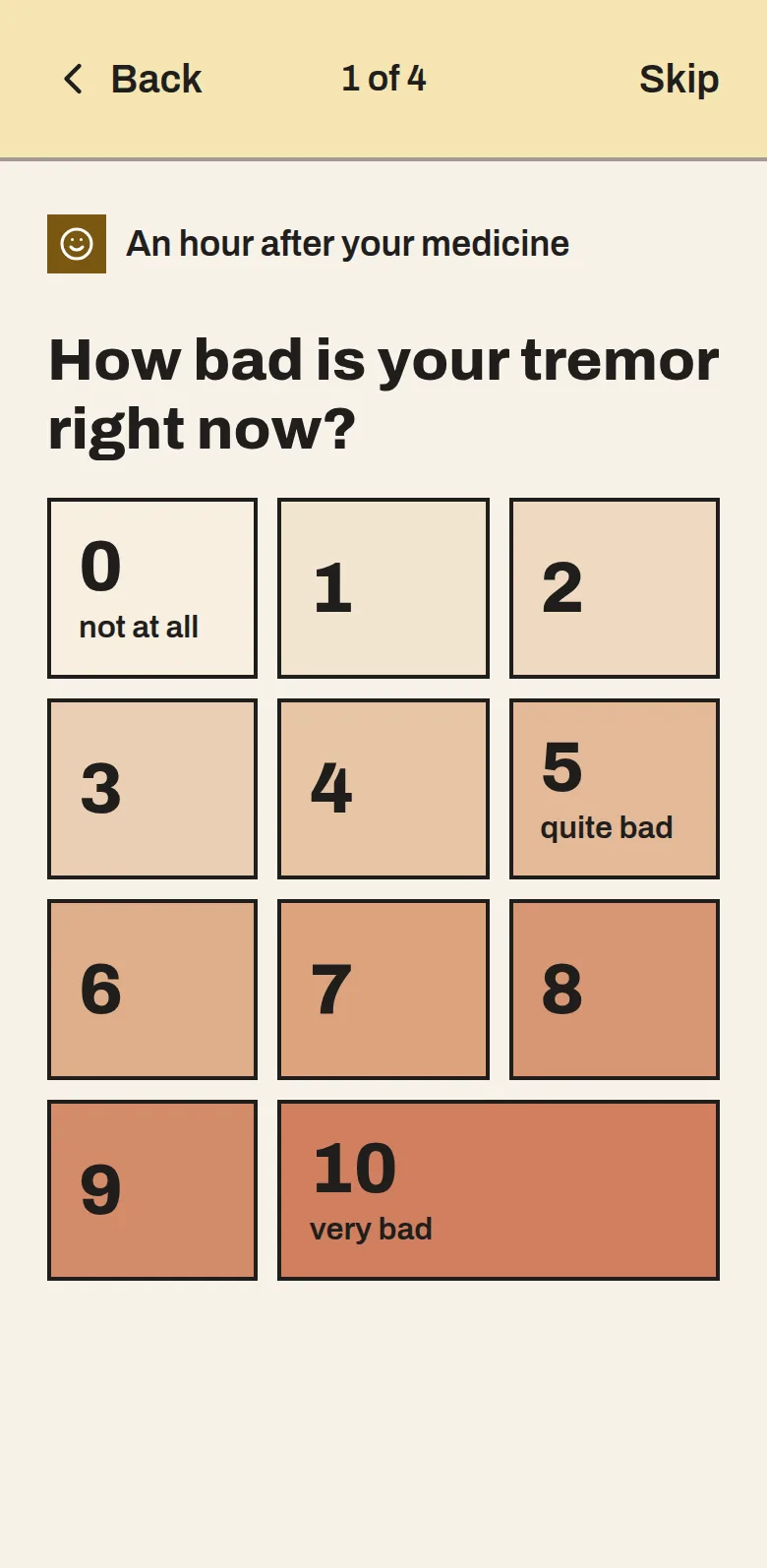
Why this app
- At homeYour symptoms change with your medicineA Parkinson's medicine works for a few hours and then wears off. So you can feel fine one moment and be stiff or shaky an hour later. That depends a lot on when you took it.
- At the doctor'sYou have to tell it from memoryYou see your neurologist a few times a year, for about fifteen minutes. Then you have to explain how the past months went. Nobody remembers that exactly, and notes on paper are often incomplete.
- The resultWithout a clear picture, adjusting is guessworkBased on what you tell, the doctor adjusts the dose or the times. If the picture is incomplete, it's hard to know what to change.
We first made ParkinsonJournal for our mother, so we could show her doctor how her days really went. Many people with Parkinson's run into the same thing. That's why anyone can now use it: the app asks at the right moment how you are, and turns it into an overview you can give your doctor.
How a day works
From the first reminder to your appointment with the doctor.
- 1At 9:00, for example
A reminder for your dose
At the times your neurologist prescribed, you get a notification. One tap tells the app you've taken it.
- 2An hour later
How are you now?
A few short questions about the symptoms you chose, such as tremor or stiffness. You answer with a number from 0 to 10.
- 3Whenever you like
Write down a question for your doctor
Something on your mind? Type it in the app straight away, so you won't forget it. It appears on the overview.
- 4Before your appointment
An overview for your doctor
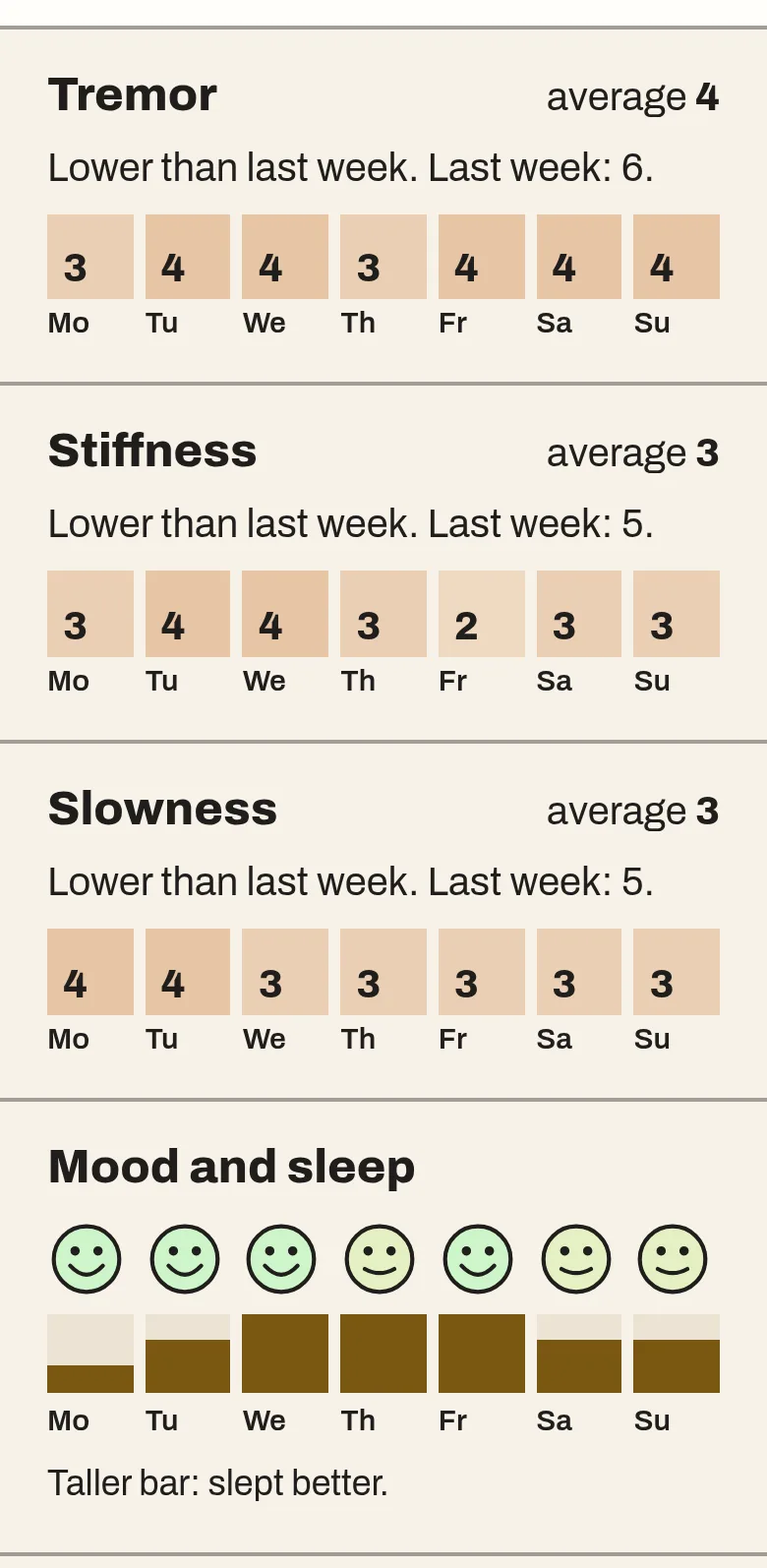
See per week and per month how things went, and make an overview of a few pages to print or email.
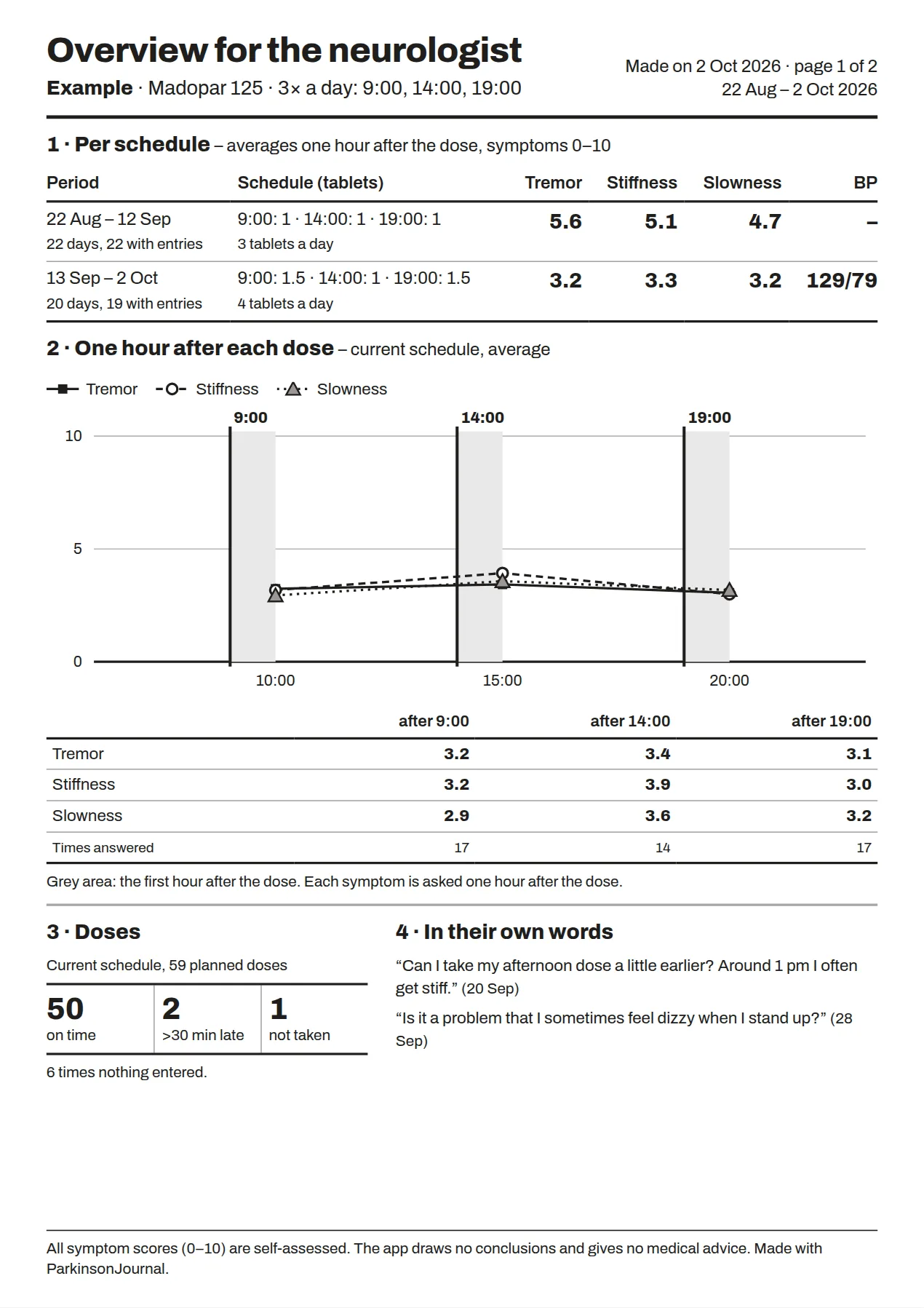
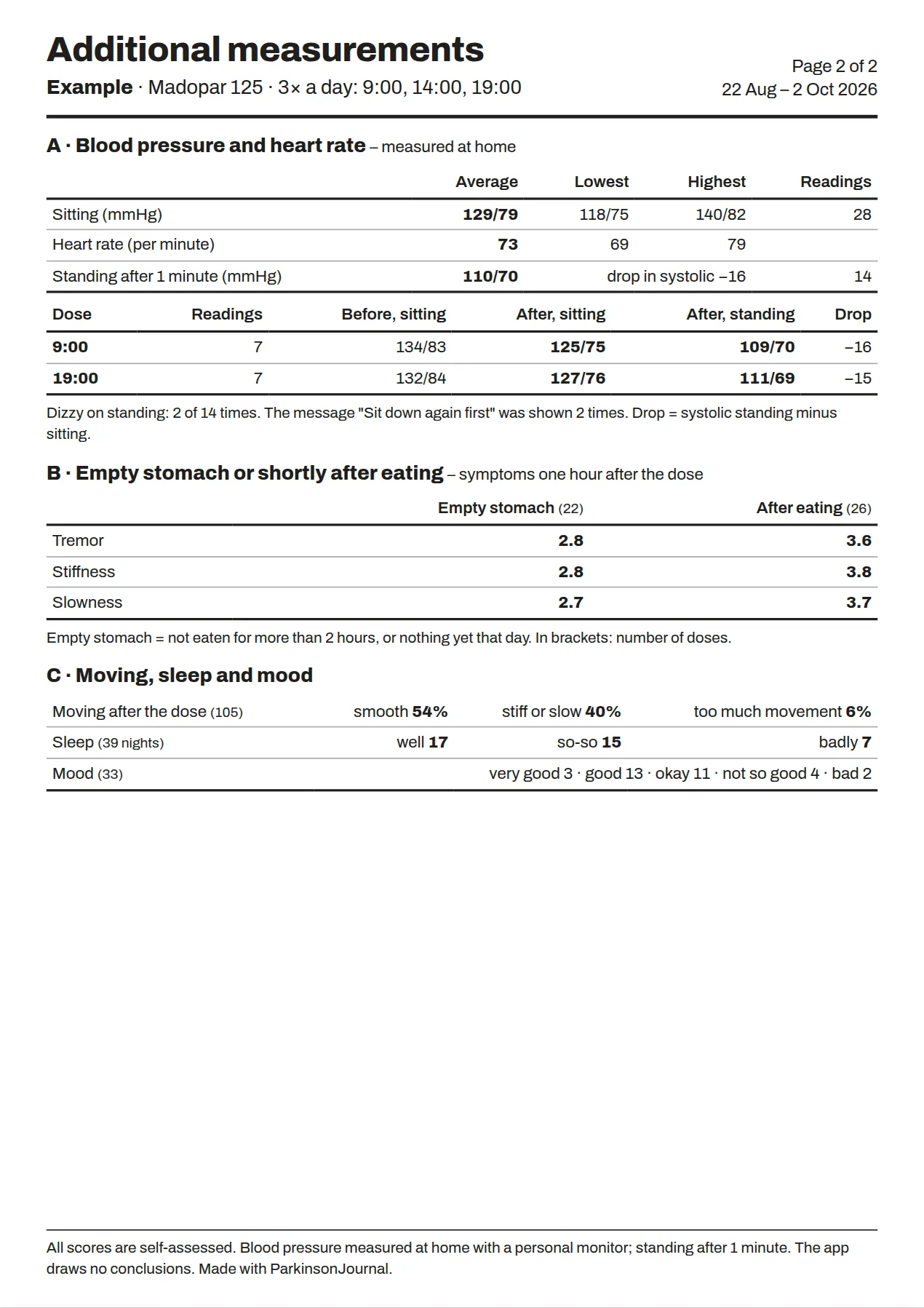
What the overview for your doctor looks like
An example with made-up data from six weeks. You create the overview yourself in the app, and print or email it before your appointment. Tap a page to see it large.
How to put the app on your iPhone or Android phone
- 1
Tap Get the app. On an iPhone use Safari, on Android use Chrome.
- 2
iPhone: tap the Share button at the bottom and choose Add to Home Screen.
Android: tap Install the app, or in the menu (three dots) choose Install app. - 3
Open the app from the icon on your home screen and set it up. It takes about 5 minutes.
The app shows these steps too. Everything you enter stays on your phone. No account needed.
On a laptop? Scan this code with your phone camera to open the app on your phone. Reminders work best there.Setting it up for your father or mother?
Often a son, daughter or partner sets up the app. That works well: you do it together on their phone in about ten minutes. After that, the app does the reminding and they only need to tap.
Good to know: everything stays on their phone. You can't follow along on your own phone. Look at the overview together, or ask them to send it to you.
Tips for setting it up
- Install the app on their phone, not on yours.
- Copy the times and the number of tablets from the prescription or the pharmacy label.
- Choose a few symptoms together, for example three. Fewer questions means it's easier to keep up.
- Turn on the sound for notifications in the phone settings, so reminders are heard.
- Make a backup now and then in the app's Settings.
Your data stays with you
- No accountYou don't need to sign up. The app never asks for your email address or password.
- Everything on your phoneYour answers, doses, questions and settings are stored only on your own phone. Not on our server.
- Only what reminders needTo remind you on time, our server keeps a random number for your phone and the times of your doses. No name, no medicine, no answers.
- Delete everything yourselfWith Delete everything in the app, your data disappears from your phone and from the server. Make a backup first if you want to keep it.
Frequently asked questions
What is a Parkinson's journal?
A journal in which you keep track of when you take your medicine and how you feel afterwards. Your neurologist or Parkinson's nurse sometimes asks you to keep one before an appointment. ParkinsonJournal does this with short questions on your phone instead of on paper.
What does it cost?
ParkinsonJournal is free. There is no subscription and no advertising.
Do I need an account?
No. You don't need to sign up and the app never asks for your email address or a password.
Does it work without internet?
Mostly, yes. After the first time the app also opens without internet and you can fill everything in; it is saved on your phone. Reminders do need an internet connection.
Does it work on iPhone and Android?
On an iPhone with iOS 16.4 or newer (via Safari) and on Android (via Chrome). It also works on a computer, but reminders work best on your phone.
Does it work with my medicine?
Yes. You type the name of your medicine yourself, for example levodopa, choose 1 to 6 doses a day and the number of tablets per dose. If your doctor changes the dose, you update it and the old schedule is kept.
Can I see when my medicine wears off?
The app asks how you are an hour after each dose, and you can tap I feel different right now in between. In Looking back and in the overview you see per dose how you felt. That helps you discuss with your doctor when the medicine works well and when it works less (often called on and off periods).
Where is my data stored?
On your own phone. Our server only knows a random number and the times of your doses, to remind you on time. Read more under Your data.
I'm getting a new phone. What now?
In the app, go to Settings and choose Save backup, and keep the file in iCloud Drive, Google Drive or your email, for example. On the new phone, choose Restore backup.
Can my doctor see my data?
Not automatically. You make the overview in the app and give it to your doctor: printed, as a PDF by email, or on your phone during the appointment.
Does the app give medical advice?
No. The app reminds, asks and lists things side by side. It draws no conclusions. Always discuss what you notice with your doctor.
Contact
Missing something in the app, or want to work together? Choose what it's about and leave a message. We'll get back to you.